Building an Actual Free PC!
Table of Contents
The Idea
The Idea of the project is to build a PC which respects my online privacy and my right to freedom. This setup might be a bit overkill for the average user, however implementing better digital practices will help you minimize digital surveillance.
Hardware
In my journey to choose the right hardware, there were many things to consider. Should I go with a laptop? A tower? A laptop seemed like the easiest option at the time, since my budget was a bit tight as a fulltime student. I knew i wanted it to be Canoebooted, so it had to be compatible. Canoebooted provides a fully FOSS BIOS, while neutralizing some parts of the Intel ME (Management Engine), which lives in all modern CPUs. AMD has a similar feature in their CPU called AMD PSP (Platform Security Processor). These security processors are embedded deeply inside the CPU, and acts like a whole separate CPU running at ring -3. These security processors are proprietary, which showcases Intel’s and AMD’s security practices, Security by obscurity. As mentioned earlier all modern CPUs are affected by this, however Canoebooting on older CPUs can practically neutralize them. On newer CPUs the security processors are embedded into every routine running on the CPU, making it near impossible to remove. On older CPUs was the security processors still in early stages, and hadn’t been integrated so deeply into every process of importance inside the CPU, hence why older CPUs is greater for freedom. Thinkpad R500, This is an excellent choice, not only is it compatible with Canoeboot, its also quite cheap, i managed to get one for 60€, with the following specs: CPU: Intel Core 2 Duo CPU T6670 (2.2 GHz) RAM: 4 GB Additionally, I replaced the proprietary WiFi card with the Atheros AR5B95 Wi-Fi module, which is compatible with Linux’s default drivers.
Flashing Canoeboot
I chose Canoeboot over Libreboot because Libreboot recently decided to retain proprietary blobs. These blobs contain unknown data, which could potentially be linked to Intel ME. Although Intel ME is neutralized in this case and may not pose an immediate issue, it still conflicts with the principle of open-source software. Since these blobs haven’t been fully reverse-engineered, we can’t determine whether they introduce vulnerabilities or even security risks.
I’ve written a full guide on how i flashed my Thinkpad R500, explaining in depth step-by-step, you can find it here.
Software
Now let’s talk software. The golden rule when choosing software is: going fully FOSS. Relying solely on FOSS not only gives you complete control over the application, it ensures the absence of a backdoor, while also dealing with the common approach in propriertary systems: “security by obscurity”.
VPN
For starters privacy begins at the network level. Most Asian countries have some kind of censorship and surveillance online. This is possible through the ISP (Internet Service Provider). All your traffic goes through your ISP, the ISP can only log metadata, such as what website you accessed, the time and duration. They don’t get access to what you do on the site while most websites use the HTTPS. Sometimes it’s the website that’s blocking you. All streaming services will detain bunch of content based on your IP’s geolocation. Essentially what a VPN does is changing your geolocation, and you give your data to the VPN company instead of your ISP. This is why choosing the right VPN is important:
- Don’t use a FREE VPN, all free VPNs is free, because they make money selling your data to data brokers, nothing is free.
- A VPN that accepts crypto, or cash. Crypto like Monero is anonymous, unlike Bitcoin. All transactions with bitcoins, can be viewed on a site like blockchain.com. Even though your address seems like random numbers and characters, they’re not. If you can’t buy your bitcoin anonymously, your bitcoin is wont be anonymous. Most countries have KYC (Know Your Customer), meaning you’ll need to identify yourself before buying any crypto. This can be fixed by mining your own coins. However at this point it’ll be easier to use Monero.
- Non logging VPN, all though nearly all VPNs promise a non logging policy, this isn’t the case. There has been numerous cases of “non logging” VPNs being searched with a warrant and the police finding logs despite their claims. Even if a VPN states it does not log user activity, factors such as mandatory data retention laws can compromise privacy.
A VPN provider i recommend is Mullvad VPN, they accept cash, gift cards and most crypto currencies. Mullvad has a no logging policy as well, the difference here being if Mullvad was to breach this policy it wouldn’t have the big difference if you buy Mullvad using an anonymous payment method. This is the case because your Mullvad account won’t be linked to your actual identity, ensuring your privacy even in the event of a breach.
Another service that ensures online anonymity is the Tor network. In a nut shell is the Tor network a decentralized network, where your PCs traffic goes through three random nodes, before your traffic reaching the site. This design choice ensures no nodes knows the full route, meaning none of the nodes know both where the request is coming from and where its going. The exit node will only know where you’re going, not from where. And the first node will only know from where, not where you’re going. In my opinion is Tor too slow to daily drive, however if you live in a country with extremely strict ruling, it might be the only choice. If your country blocks the Tor network you should look into bridges.
With this said a VPN won’t magically secure your identity online. We live in a world where VPNs are being glorified by content creators, saying it’s a must for online privacy. This is far from the truth, most are sponsored by VPN companies, and doesn’t have your your best interests in mind. In most cases a VPN isn’t enough for online protection, websites use cookies and fingerprint techniques to track your activity online. VPNs is useful for people living in a country with strict governments and pirates.
Browser
This leads us to the next concern, your browser. Most websites use a lot of tricks when tracking you. In most cases your browser will have an unique fingerprint consisting of data like screen resolution, user-agent, etc. Most of the fingerprinting is done by javascript, disabling java script will eliminate 90% of the fingerprinting done by your browser, however most modern websites break when disabling javascript. You can check how secure your current browser is, here. If you’re looking for technical information check out this.
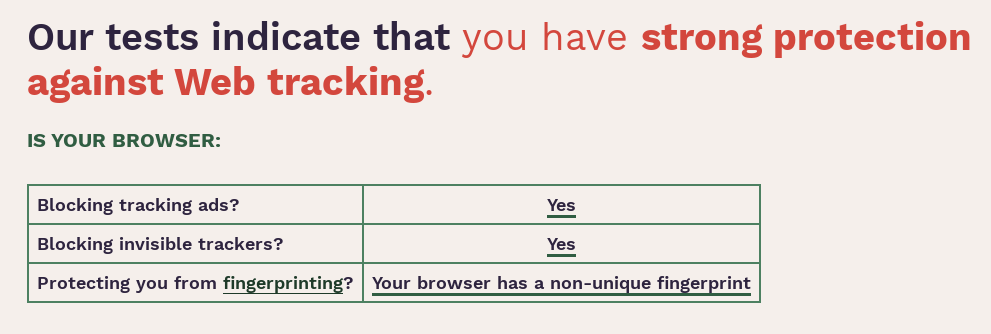
While Chrome is a popular choice, it continuously collects user data for advertising. Firefox is the better choice while giving you lower RAM usage, and freeing you from Google’s ecosystem. Firefox out of the box leaves you exposed. Using ghacks-user.js as a template for your Firefox config, will immensely help your browser. Furthermore there is an alternative. Mullvad Browser, which was made in collaboration with the Tor Project. Mullvad Browser is essentially the Tor Browser, but without Tor Network. Mullvad Browser is a great out of the box solution. Here is my result using Mullvad Browser:
OS
Now the operating system. The foundation, if your OS doesn’t respect your privacy, it doesn’t matter what security measures you take, your data is compromised from the start. Windows is proprietary and a big advocate for “security by obscurity”, furthermore Windows has a bunch of opt in features which tracks your activity. Next candidate, Tails OS. Tail OS is a great choice, but more of a portable OS than a real OS. Next: QubeOS, which splits different tasks into separate VMs, in case of a breach the whole system wont get compromised. This is a heavy OS. Next: Whonix. Whonix’s goal is to hide your real IP, which is done via VMs and the Tor Protocol. Lastly: Trisqel mini. Trisqel is an ordinary OS, free from proprietary drivers. Trisqel may be missing some fancy security features, its lightweight and can run on almost any PC. This is perfect for my old Thinkpad R500.
Communication
For secure communication, use an end-to-end encrypted messaging app like Signal. Registration requires a phone number, ensuring privacy but not complete anonymity. If anonymity is a concern as well you can buy a burner phone as well a burner sim card using cash. In most countries you can get a sim card without KYC, otherwise you’ll have to look online.
Opting for a paid email service reduces the risk of your email provider monetizing your data. Free email providers often rely on data mining and selling user information to sustain their services.
Search Engine
Stop daily driving google.com. Google is the largest data collector. Consider using:
online OPSEC
I recommend reading: the opsec bible. Here is a archived version: bible_archive.zip.