Lua Virtualization Part 1: The Internals of the Lua VM
Table of Contents
This is part 1 of a 5 part series about Lua Virtualization:
- Part 1: The Internals of the Lua VM
- Part 2: Obfuscation techniques
- Part 3: Taking a Look at Luraph
- Part 4: Devirtualizing Luraph
- Part 5: Actually Devirtualizing Luraph
Lua is used so widely in games, configuration systems, and embedded scripting because it’s a register-based virtual machine, which mirrors its C API, making it straightforward to bind C++ functions to Lua.
Lua #101
Lua to luac
When you execute Lua code, the compiler will compile the code to Luac. Luac is a high-level set of instructions, the Lua VM uses. For example this
print("Hello World!")
Will be compiled into the Luac (Using lua 5.1 and this interactive compiler, or the luac binary)
main (4 instructions, 16 bytes at 0x55e5d6156860)
0+ params, 2 slots, 0 upvalues, 0 locals, 2 constants, 0 functions
        1       [1]     GETGLOBAL       0 -1    ; print
        2       [1]     LOADK           1 -2    ; "Hello World!"
        3       [1]     CALL            0 2 1
        4       [1]     RETURN          0 1
constants (2) for 0x55e5d6156860:
        1       "print"
        2       "Hello World!"
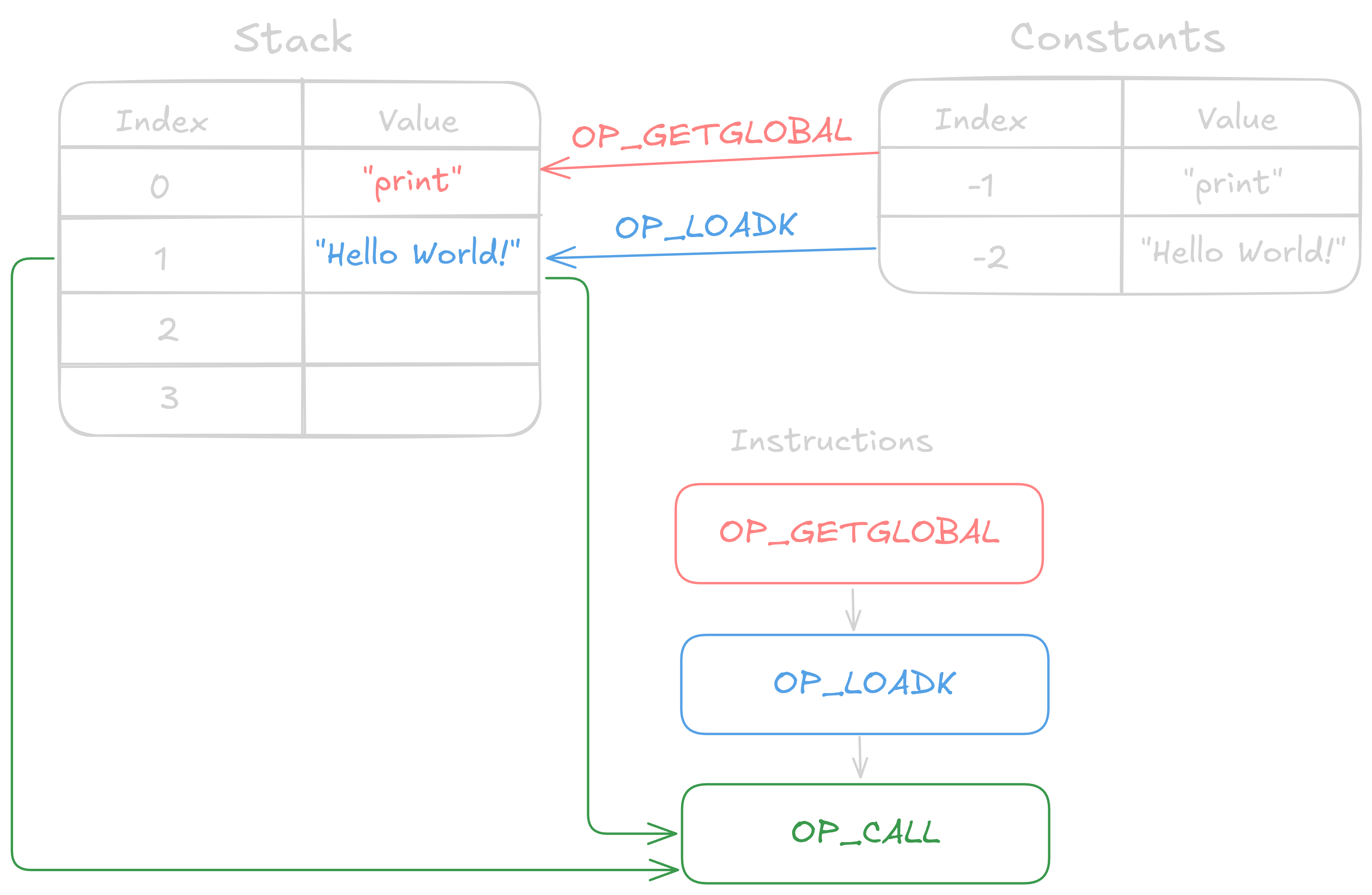
In the generated Luac bytecode, the instructions needed to print “Hello World!”. An instruction consists of an OpCode, as well as the given register indexes. For example, we see the first instruction is a GETGLOBAL, with the register indexes 0 and -1. A negative index points to the constant table, instead of the register stack. Looking at the constant table at index 1, is the string "print" located. Taking a look at the source code, we see the file lopcodes.h which contains a description of all OpCodes. Taking a look at GETGLOBAL:
OP_GETGLOBAL,/* A Bx R(A) := Gbl[Kst(Bx)] */
Here we see it takes the register indexes A and Bx. R(A) is the syntax for the register located at index A. We see that R(A) is being set to the Kst(Bx)‘th index of the global table. Here, Kst emphasizes that the value Bx is a constant.
Therefore, our first instruction will load the print function to the register stack at index 0.
Taking a look at the next instruction, the executing OpCode is LOADK 1 -2, taking a look at the definition of LOADK:
OP_LOADK,/* A Bx R(A) := Kst(Bx) */
Here it’s clear, it loads the constant in Bx‘th index in the constant table to the A‘th index on the stack. With our given register indexes 1 and -2 will load "Hello World!" into the 1st register on the stack.
The last instruction before the RETURN is a CALL 0 2 1 with the given definition:
OP_CALL,/* A B C R(A), ... ,R(A+C-2) := R(A)(R(A+1), ... ,R(A+B-1)) */
Here we’ll emphasize the R(A+C-2) := R(A)(R(A+1) part. Starting with the right side, we notice the fact that it’s invoking the function located at the A’th index on the stack, by the notation: R(A)(...). This function is invoked with the given parameter located in A + 1‘th index. Finally, the output of the function is stored on the stack at A + C - 2‘th index. When calculating the index of the output, we get: 0 + 1 - 2 = -1. This would mean we’d have to store the output as a constant, luckily for us, this means there is no output of the function.
I’ve made a graph over the bytecode we’ve just gone through:
Luac to lua
Now we’ve compiled lua to luac, we’ll now reverse this process, using the decompiler Unluac made by tehtmi. Using Unluac on our luac code:
$ java -jar unluac.jar luac.out
We’ll see the following output:
local STACK_0 = "Hello World!"
print(STACK_0)
While this isn’t a one-to-one copy of the original source, this code will, in fact, produce the same bytecode, so we will never get the same source code once decompiled.
Constants
Inside lua.h we’ll find the different types of constants:
#define LUA_TNIL                0
#define LUA_TBOOLEAN            1
#define LUA_TNUMBER             3
#define LUA_TSTRING             4
NIL is empty. And in most cases ignored unless NIL actually has to be inside a register.
BOOLEAN is either 1 for true or 0 for false
NUMBER all numbers are stored as a double, you can read more about how doubles are actually stored here.
STRING doesn’t store the null terminator \0 of the string, so the length of the string is actually length - 1.
Registers
Now we’ll explore how the registers of Lua are composed. lopcodes.h:
#define SIZE_C          9
#define SIZE_B          9
#define SIZE_Bx         (SIZE_C + SIZE_B)
#define SIZE_A          8
#define SIZE_OP         6
Here it’s clear that:
Reg. A: 8 bit
Reg. B: 9 bit
Reg. C: 9 bit
Reg. Bx: 18 bit
Reg. sBx: signed Bx
OpCode: 6 bit
Taking a look at the register’s position in the instruction,n we see:
#define POS_OP          0
#define POS_A           (POS_OP + SIZE_OP)
#define POS_C           (POS_A + SIZE_A)
#define POS_B           (POS_C + SIZE_C)
#define POS_Bx          POS_C
This tells us that an instruction is composed like this:

Function prototypes
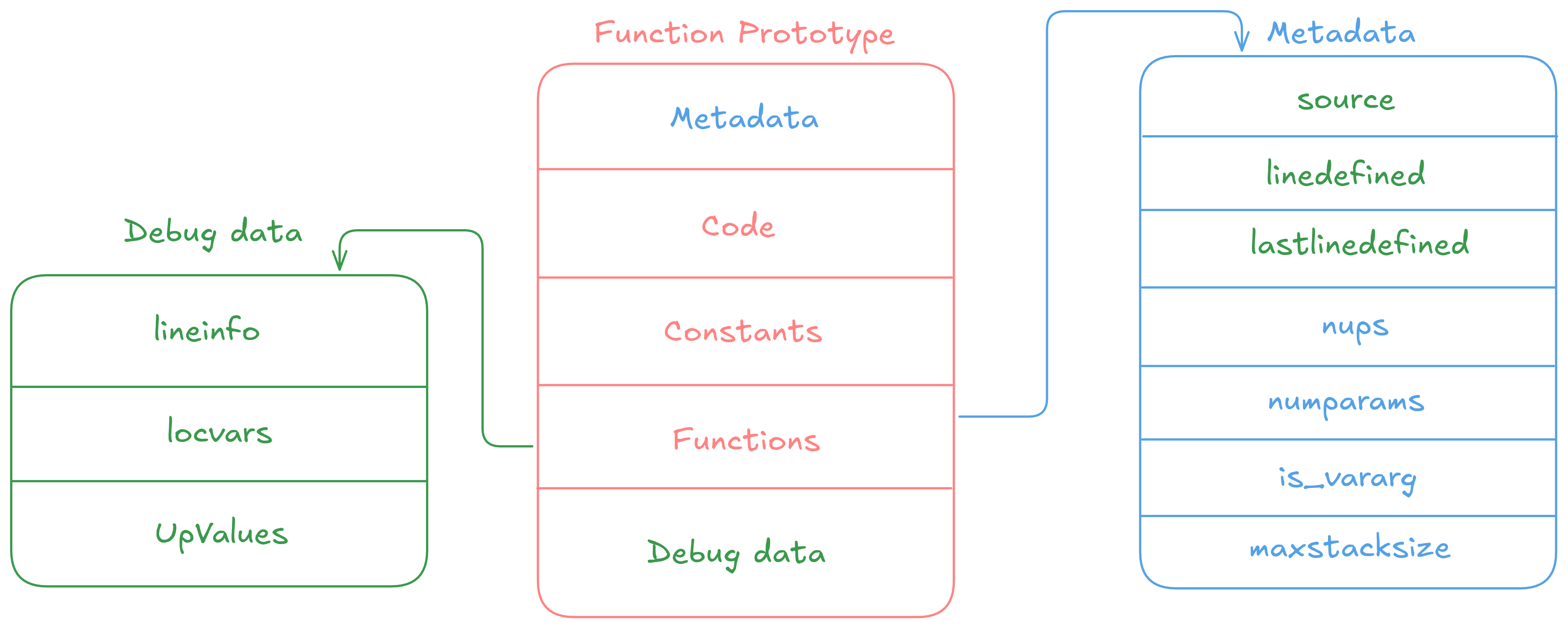
There is a main function, and everything else is then nested inside this main function.
Function prototype
Metadata is the metadata of the function.
Code is an array of instructions. Before the code member, there is n_code, which is the count of instructions.
Constants is an array of constants. Before this is again a sizek, which is the number of constants.
Functions is an array of sub functions, meaning all functions defined inside this function. Here is a given sizep which is the number of sub functions.
Debug data is data included when not compiled with the -s flag, which strips the luac file for debug information. The source, linedefined, and lastlinedefined will also be removed when including the strip flag.
Metadata:
source is the name of the file for the main function, and the function name for all other functions.
linedefined describes at what line the function is defined with the function keyword.
lastlinedefined describes what line has the end keyword.
nups is the number of UpValues.
numparams is the number of parameters the function will use.
is_vararg is the number of variable arguments parsed into the function.
maxstacksize describes the maximum stack size needed to invoke the function.
Debug data
lineinfo is a list containing the line number of the code. Has sizelineinfo
locvars is a list of the variable names of the local variables. Has sizelocvars
UpValues is a list of the UpValue names. Has sizeupvalues
UpValues
UpValues are external variables that are captured by a CLOSURE in Lua. They are variables from an enclosing scope that remains inside a nested function, even after the outer function has returned.
Here is an example, where the enclosing function is the main function, and foo is an UpValue being parsed to the nested function bar:
local foo = 0
local function bar()
    foo = 1
end
bar()
WTF is a CLOSURE?
It’s quite simple, actually. It’s a function that “remembers” the environment where it was defined. Let’s use the example from before. When we define the function bar, a CLOSURE OpCode is called, this essentially saves the environment needed to run the nested function.
UpValues in the lua VM
Now you know what an UpValue is, let’s set it into perspective relative to the lua VM. There exist two types of UpValues, those with in_stack = 1 or in_stack = 0. In stack being 1 means that the UpValue is local to the enclosing function, meaning the idx of the UpValue will be the index in the stack. In stack being 0 means that the UpValue is not local to the enclosing function, and might be from the outer function, this means the idx will be the index in the UpValue list of the enclosing function.
Now you might have noticed that the lua VM only has the count of UpValues and nothing else seen from the illustration here. Now you’re probably wondering how the CLOSURE will know what to save from the current environment and parse into the new?
This is done by MOVE for in_stack = 1 and GETUPVAL for in_stack = 0 followed by a CLOSURE. So the amount of nups in the function that is defined with a CLOSURE is the number of instructions that are skipped and not executed after the CLOSURE. For example, if there are 4 UpValues in a function, the 4 instructions coming after the CLOSURE call will be skipped as they only store metadata about the 4 UpValues. The idx of the UpValue is the value of the B register of the metadata instructions.
Now let’s walk through an example:
local upval_1 = 0
local function outer()
    upval_1 = "in_stack = 1"
    local function inner()
        upval_1 = "in_stack = 0"
    end
    inner()
end
outer()
First, we see that the enclosing function to outer has the UpValue upval because it’s being accessed inside the nested function outer. Here is the upval local to the enclosing function, meaning it’ll have in_stack = 1. Then we see one more nested function inner, this also accesses the upval variable, but this time it’s not local to the enclosing function (outer), where in_stack = 0.
Now let’s take a look at the corresponding luac:
main (6 instructions, 24 bytes at 0x557408aac860)
0+ params, 3 slots, 0 upvalues, 2 locals, 1 constant, 1 function
        1       [1]     LOADK           0 -1    ; 0
        2       [8]     CLOSURE         1 0     ; 0x557408aaccd0
        3       [8]     MOVE            0 0
        4       [9]     MOVE            2 1
        5       [9]     CALL            2 1 1
        6       [9]     RETURN          0 1

function outer (7 instructions, 28 bytes at 0x557408aaccd0)
0 params, 2 slots, 1 upvalue, 1 local, 1 constant, 1 function
        1       [3]     LOADK           0 -1    ; "in_stack = 1"
        2       [3]     SETUPVAL        0 0     ; upval
        3       [6]     CLOSURE         0 0     ; 0x557408aad060
        4       [6]     GETUPVAL        0 0     ; upval
        5       [7]     MOVE            1 0
        6       [7]     CALL            1 1 1
        7       [8]     RETURN          0 1

function inner (3 instructions, 12 bytes at 0x557408aad060)
0 params, 2 slots, 1 upvalue, 0 locals, 1 constant, 0 functions
-- REMOVED
Inside the main function, we see the CLOSURE instruction for the outer function, which only has 1 UpValue, therefore is the MOVE instruction after the CLOSURE is just metadata. Since it’s a MOVE opcode aligns with what we expected since the UpValue is local to the enclosing function and therefore is on the stack. Looking at the MOVE‘s B register, it’s 0, meaning the UpValue is located inside the stack at idx 0, we can verify this by looking at the code before the CLOSURE, here it’ll be clear that out upval variable is located in 0th index, because of the LOADK loading our constant into the 0th index.
Looking at the outer function, we see a CLOSURE, but this time for the inner function. The inner function has 1 UpValue as well, meaning the following GETUPVAL is metadata. Because of the GETUPVAL it’s clear that the UpValue is not local to the enclosing function, therefore, in_stack = 0. Taking a look at the B register of the GETUPVAL OpCode it’s 0, making sense as this is the first OpCode used inside the inner function.
The Cheat Sheet
There exists a thoroughly written document explaining all OpCodes in depth: Lua 5.3 Bytecode Reference. This is good, even though it’s written for version 5.3, most of the OpCodes are the same.
I also found this A No-Frills Introduction to Lua 5.1 VM Instructions, which looks promising.
Modifying the Source Code
The most essential Source Code file is the lvm.c which handles the execution of OpCodes, this can allow us to see how the VM works.
Looking at ldump.c and print.c will give us a pretty good understanding of how luac is stored, ldump.c reads the luac code and loads it. print.c will handle the output we see when compiling with the list tag included: luac -l -l <file.lua>. Modifying both ldump.c and print.c to print out more debug information will help us gain a greater understanding of how the luac file should be read and what data it may contain. Here you’ll find my modified version of both print.c and ldump.c where I’ve added more debug output.